
Managing Screen Time in Online Learning
Study strategies to minimize screen time in a digital world.
The ability to enrol in an Ontario Ministry of Education online school from anywhere in the world is all thanks to technology. With internet access and a device, students can earn an Ontario Secondary School Diploma from anywhere in the world, in whatever timing works best for them-whether that looks like fast tracking their high school courses, or taking extra time in the courses they need. The freedom that technology has given to education goes beyond the classroom and the assistive devices that students in classes can access, and now extends to homes, where students can decide when and how they learn.
Having increased control over education does lend some parents and students to question the pros and cons of online high school. The benefits of online high school are evident in the 98% rate of Ontario Virtual School students accepted into post-secondary programs and the over 30,000 OSSD credits students have earned. However, one concern many families have with virtual learning is the increase in screen time, a topic that is also widely discussed in today’s technology-driven world. While technology has brought many valuable opportunities and benefits, it’s important to create a healthy balance and build awareness around responsible technology use so students can fully benefit from all it has to offer. With proper habits, boundaries and education surrounding technology use, students can take advantage of the many benefits of online learning while still maintaining a healthy lifestyle (and even building a healthier one). Below are 3 ways to manage screen time for students enrolled in virtual high school courses.
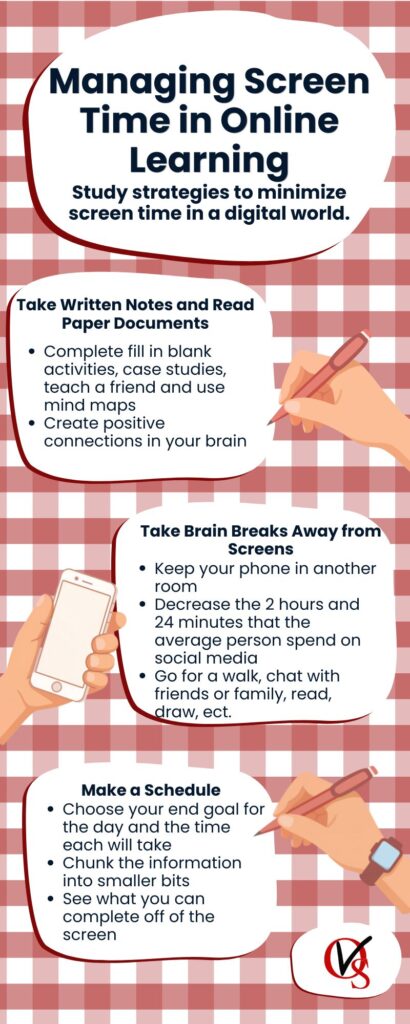
1. Take written notes and read paper documents
Ontario Virtual School provides multiple means of learning the course information. While the information is accessed virtually, the means through which you interact with the information does not need to be. The internet connection and screen you have is like your classroom. Many effective students don’t just study within their classroom. Take what you learned within your course and take notes on paper. Not only does this decrease screen time, but handwriting notes positively impact the brain’s connectivity patterns which positively impacts learning and memory (Van der Weel & Van der Meer, 2024). Ontario Virtual School recognizes these benefits, providing PDF notes and readings to help students learn outside their device. Varying the means that you interact with the material may further help information consolidation by keeping your interest peaked. Check out the 4 study methods below that don’t require lots of screen time (complete before or after writing a first round of notes):
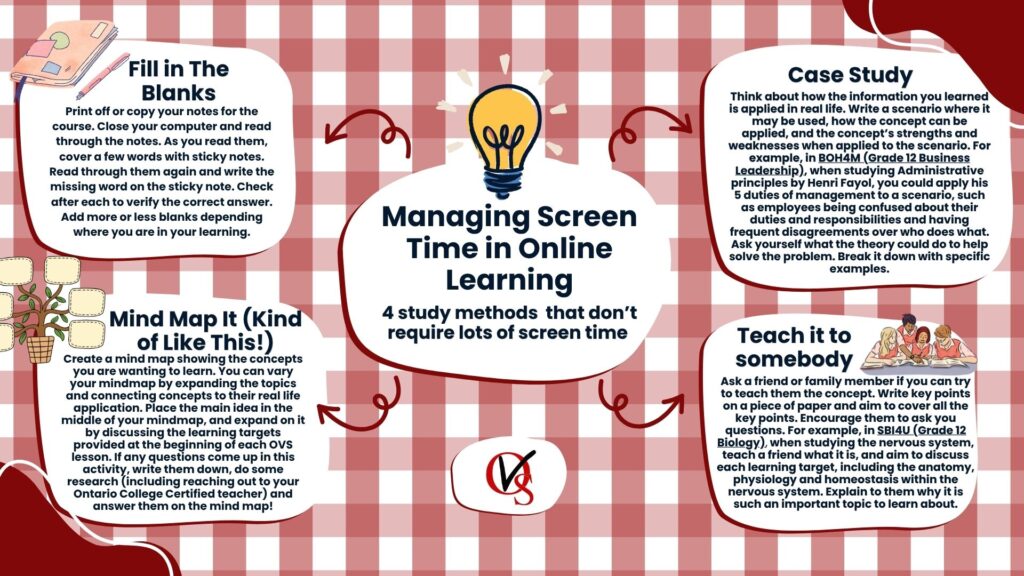
- Fill in the blanks → Print off or copy your notes for the course. Close your computer and read through the notes. As you read them, cover a few words with sticky notes. Read through them again and write the missing word on the sticky note. Check after each to verify the correct answer. Add more or less blanks depending where you are in your learning.
- Mind map it → Create a mind map showing the concepts you are wanting to learn. You can vary your mindmap by expanding the topics and connecting concepts to their real life application. Place the main idea in the middle of your mindmap, and expand on it by discussing the learning targets provided at the beginning of each OVS lesson. If any questions come up in this activity, write them down, do some research (including reaching out to your Ontario College Certified teacher) and answer them on the mind map!
- Case study → Think about how the information you learned is applied in real life. Write a scenario where it may be used, how the concept can be applied, and the concepts’ strengths and weaknesses when applied to the scenario. For example, in BOH4M (Grade 12 Business Leadership), when studying Administrative principles by Henri Fayol, you could apply his 5 duties of management to a scenario, such as employees being confused about their duties and responsibilities and having frequent disagreements over who does what. Ask yourself what the theory could do to help solve the problem. Break it down with specific examples.
- Teach it to somebody → Ask a friend or family member if you can try to teach them the concept. Write key points on a piece of paper and aim to cover all the key points. Encourage them to ask you questions. For example, in SBI4U (Grade 12 Biology) when studying the nervous system, teach a friend what it is, and aim to discuss each learning target, including the anatomy and physiology and homeostasis within the nervous system. Explain to them why it is such an important topic to learn about.
Your online learning study habits do not need to revolve around screen use. Practicing other methods of studying will lead you to finding what works best for you. And that flexibility is why students choose virtual learning.
2. Brain breaks away from the screen
Taking brain breaks is key to effective learning, and in virtual learning, you can choose when and how you take your breaks. However, much like using technology, brain breaks are most effective when you know how to use them. When you need to step away from your studies, avoid stepping into your device. Many students find themself reaching for their smartphone when it’s time for a well-deserved break. Exercising self control and educating yourself using technology to learn is a positive use, but reaching for it for a break can increase fatigue and decrease future productivity (Kang & Ketzburg, 2019). The average person spends 2 hours and 24 minutes on social media a day (University of Maine, nd). If your goal is to decrease screentime, try going for a walk, doodling, playing a board game, calling someone, playing with a pet or reading a book when you need a break. If needed, removing your smartphone from your study space may help eliminate mindless scrolling between work.
3. Schedule
Setting a schedule for your online learning not only can increase your productivity within your work, but it can help you decrease screen time by eliminating the desire to reach for your phone when you need a break. Furthermore, this allows you to set goals and a timeline for the day of when you wish to complete them. Think about your goal for the day, and break down the task.
For example, in your CPW4U (Canadian Politics) course, your goal could be to start your Unit 1 assignment before the end of set time. Break down your day by thinking about how long it will take you to read through the remainder of the course and take notes, how long you will need to complete a practice activity (whether this be from the homework booklet provided by OVS or your own review) and how long you will need to start the assignment. Look at the assignment and determine if you would be able to complete any of the assignments by hand. Could you write the assignment notes by hand (if able to in the course – ask your instructor)? Organize your thoughts on paper? Writing out your schedule may help you stick to it and give you the satisfaction of crossing items off your list. Write out the schedule on paper so you don’t get distracted by social media when checking in with your progress.
Another handy trick to minimize screentime while completing online high school is to schedule your work periods at times where it is not convenient to be outside and active (when possible). On a sunny summer day, if you can focus later in the day on work, aim to spend time outside when the sun is out, and sit down to do work later when it’s not as light or nice out. Most people reach for their phones around 6pm to 11pm (Carlson, 2026). Aim to reach for your technology for more productive purposes at this time and do school work instead of scrolling.
Online high school student life does not need to mean increased screen time. Using technology appropriately and balancing screen time ensures that students maintain healthy boundaries with their technology use. Parental involvement in online school can start with helping your child set boundaries. These boundaries will build healthy technology practices, enhancing their digital citizenship. Learn more about the countless skills virtual learning can build at ontariovirtualschool.ca!
Question and Answers:
Q: Why is screen time a concern in online learning?
A: While online learning offers flexibility and accessibility, students can end up spending long periods on devices. Too much screen time can lead to fatigue, distraction, and reduced productivity, making it important to build healthy technology habits.
Q: How can students study while reducing screen time?
A: Students can take handwritten notes, print readings, create mind maps, practice with case studies, or teach concepts to someone else. These methods help reinforce learning while giving students a break from screens.
Q: What are some effective brain breaks away from technology?
A: Going for a walk, reading a book, doodling, playing with a pet, calling a friend, or playing a board game are all great ways to recharge without adding more screen time.
Q: How does creating a schedule help manage screen time?
A: A schedule helps students stay organized, set goals, and avoid unnecessary scrolling. Writing tasks and timelines on paper can also reduce distractions from social media and keep students focused.
Q: Can online learning still support a healthy lifestyle?
A: Yes. With balanced screen habits, proper breaks, and effective study strategies, students can enjoy the flexibility of online learning while maintaining healthy routines and strong academic success.
Sources:
eCampusOntario. (n.d.). Exploring dual coding. In Virtual environment success strategies. Pressbooks. https://ecampusontario.pressbooks.pub/virtualenvironmentsuccessstrategies/chapter/exploring-dual-coding/
Author(s). (2023). Title of article. Frontiers in Psychology, 14, Article 1219945. https://doi.org/10.3389/fpsyg.2023.1219945
Author(s). (2019). Title of article. Journal of Behavioral Addictions, 8(3), 395–406. https://doi.org/10.1556/2006.8.2019.39
University of Maine. (n.d.). Social media statistics details. https://umaine.edu/undiscoveredmaine/small-business/resources/marketing-for-small-business/social-media-tools/social-media-statistics-details/
TestMySpeed. (n.d.). How internet traffic affects speed. https://www.testmyspeed.com/insights/how-internet-traffic-affects-speed
Written by Katelyn Van Hezewyk (OVS Teacher)